End-to-End Tutorial: Training a Neural Network with Keras and Xbatcher#
Import Required Libraries#
[1]:
import matplotlib.pyplot as plt
import tensorflow as tf
import xarray as xr
from keras import layers, models, optimizers

import xbatcher as xb
import xbatcher.loaders.keras
2025-09-04 22:03:03.211808: I tensorflow/core/util/port.cc:153] oneDNN custom operations are on. You may see slightly different numerical results due to floating-point round-off errors from different computation orders. To turn them off, set the environment variable `TF_ENABLE_ONEDNN_OPTS=0`.
2025-09-04 22:03:03.458384: I tensorflow/core/platform/cpu_feature_guard.cc:210] This TensorFlow binary is optimized to use available CPU instructions in performance-critical operations.
To enable the following instructions: SSE4.1 SSE4.2 AVX AVX2 AVX512F AVX512_VNNI AVX512_BF16 FMA, in other operations, rebuild TensorFlow with the appropriate compiler flags.
[2]:
# Open the dataset stored in Zarr format
ds = xr.open_dataset(
    's3://carbonplan-share/xbatcher/fashion-mnist-train.zarr',
    engine='zarr',
    chunks={},
    backend_kwargs={'storage_options': {'anon': True}},
)
Define Batch Generators#
[3]:
# Define batch generators for features (X) and labels (y)
X_bgen = xb.BatchGenerator(
    ds['images'],
    input_dims={'sample': 2000, 'channel': 1, 'height': 28, 'width': 28},
    preload_batch=False,  # Load each batch dynamically
)
y_bgen = xb.BatchGenerator(
    ds['labels'], input_dims={'sample': 2000}, preload_batch=False
)
Map Batches to a Keras-Compatible Dataset#
[4]:
# Use xbatcher's MapDataset to wrap the generators
dataset = xbatcher.loaders.keras.CustomTFDataset(X_bgen, y_bgen)

# Create a DataLoader using tf.data.Dataset
train_dataloader = tf.data.Dataset.from_generator(
    lambda: iter(dataset),
    output_signature=(
        tf.TensorSpec(shape=(2000, 1, 28, 28), dtype=tf.float32),  # Images
        tf.TensorSpec(shape=(2000,), dtype=tf.int64),  # Labels
    ),
).prefetch(3)  # Prefetch 3 batches to improve performance
[5]:
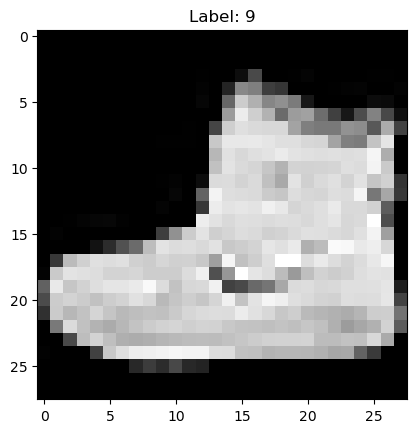
## Visualize a Sample Batch
[6]:
# Extract a batch from the DataLoader
for train_features, train_labels in train_dataloader.take(1):
    print(f'Feature batch shape: {train_features.shape}')
    print(f'Labels batch shape: {train_labels.shape}')

    img = train_features[0].numpy().squeeze()  # Extract the first image
    label = train_labels[0].numpy()
    plt.imshow(img, cmap='gray')
    plt.title(f'Label: {label}')
    plt.show()
    break
Feature batch shape: (2000, 1, 28, 28)
Labels batch shape: (2000,)
Build a Simple Neural Network with Keras#
[7]:
# Define a simple feedforward neural network
model = models.Sequential(
    [
        layers.Flatten(input_shape=(1, 28, 28)),  # Flatten input images
        layers.Dense(128, activation='relu'),  # Fully connected layer with 128 units
        layers.Dense(10, activation='softmax'),  # Output layer for 10 classes
    ]
)

# Compile the model
model.compile(
    optimizer=optimizers.Adam(learning_rate=0.001),
    loss='sparse_categorical_crossentropy',
    metrics=['accuracy'],
)

# Display model summary
model.summary()
/home/docs/checkouts/readthedocs.org/user_builds/xbatcher/conda/latest/lib/python3.10/site-packages/keras/src/layers/reshaping/flatten.py:37: UserWarning: Do not pass an `input_shape`/`input_dim` argument to a layer. When using Sequential models, prefer using an `Input(shape)` object as the first layer in the model instead.
  super().__init__(**kwargs)
Model: "sequential"
┏━━━━━━━━━━━━━━━━━━━━━━━━━━━━━━━━━┳━━━━━━━━━━━━━━━━━━━━━━━━┳━━━━━━━━━━━━━━━┓
┃ Layer (type)                    ┃ Output Shape           ┃       Param # ┃
┡━━━━━━━━━━━━━━━━━━━━━━━━━━━━━━━━━╇━━━━━━━━━━━━━━━━━━━━━━━━╇━━━━━━━━━━━━━━━┩
│ flatten (Flatten)               │ (None, 784)            │             0 │
├─────────────────────────────────┼────────────────────────┼───────────────┤
│ dense (Dense)                   │ (None, 128)            │       100,480 │
├─────────────────────────────────┼────────────────────────┼───────────────┤
│ dense_1 (Dense)                 │ (None, 10)             │         1,290 │
└─────────────────────────────────┴────────────────────────┴───────────────┘
Total params: 101,770 (397.54 KB)
Trainable params: 101,770 (397.54 KB)
Non-trainable params: 0 (0.00 B)
Train the Model#
[8]:
%%time

# Train the model for 5 epochs
epochs = 5

model.fit(
    train_dataloader,  # Pass the DataLoader directly
    epochs=epochs,
    verbose=1,  # Print progress during training
)
Epoch 1/5
30/30 ━━━━━━━━━━━━━━━━━━━━ 13s 404ms/step - accuracy: 0.6118 - loss: 1.1004
Epoch 2/5
2025-09-04 22:03:19.643621: I tensorflow/core/framework/local_rendezvous.cc:405] Local rendezvous is aborting with status: OUT_OF_RANGE: End of sequence
         [[{{node IteratorGetNext}}]]
/home/docs/checkouts/readthedocs.org/user_builds/xbatcher/conda/latest/lib/python3.10/site-packages/keras/src/trainers/epoch_iterator.py:164: UserWarning: Your input ran out of data; interrupting training. Make sure that your dataset or generator can generate at least `steps_per_epoch * epochs` batches. You may need to use the `.repeat()` function when building your dataset.
  self._interrupted_warning()
30/30 ━━━━━━━━━━━━━━━━━━━━ 12s 393ms/step - accuracy: 0.7744 - loss: 0.5784
Epoch 3/5
2025-09-04 22:03:31.373158: I tensorflow/core/framework/local_rendezvous.cc:405] Local rendezvous is aborting with status: OUT_OF_RANGE: End of sequence
         [[{{node IteratorGetNext}}]]
30/30 ━━━━━━━━━━━━━━━━━━━━ 12s 389ms/step - accuracy: 0.7995 - loss: 0.4994
Epoch 4/5
30/30 ━━━━━━━━━━━━━━━━━━━━ 12s 393ms/step - accuracy: 0.8114 - loss: 0.4618
Epoch 5/5
2025-09-04 22:03:54.730456: I tensorflow/core/framework/local_rendezvous.cc:405] Local rendezvous is aborting with status: OUT_OF_RANGE: End of sequence
         [[{{node IteratorGetNext}}]]
30/30 ━━━━━━━━━━━━━━━━━━━━ 12s 391ms/step - accuracy: 0.8193 - loss: 0.4374
CPU times: user 14.6 s, sys: 3.14 s, total: 17.7 s
Wall time: 59.3 s
[8]:
<keras.src.callbacks.history.History at 0x7810926094e0>
Visualize a Sample Prediction#
[9]:
# Visualize a prediction on a sample image
for train_features, train_labels in train_dataloader.take(1):
    img = train_features[0].numpy().squeeze()
    label = train_labels[0].numpy()
    predicted_label = tf.argmax(model.predict(train_features[:1]), axis=1).numpy()[0]

    plt.imshow(img, cmap='gray')
    plt.title(f'True Label: {label}, Predicted: {predicted_label}')
    plt.show()
    break
1/1 ━━━━━━━━━━━━━━━━━━━━ 0s 53ms/step

Key Highlights#
Dynamic Batching: Xbatcher and the MapDataset class allow for dynamic loading of batches, which reduces memory usage and speeds up data processing.
Prefetching: The prefetch feature in
tf.data.Datasetoverlaps data loading with model training to minimize idle time.Compatibility: The pipeline works seamlessly with
keras.Model.fit, simplifying training workflows.